TL;DR: I rebuilt a 200-command CLI for AI agent consumption. The commands stayed the same — I changed help text, output formats, exit codes, and examples. Every agent failure traced back to missing or ambiguous interface information, and every fix was a documentation change, not a code change.
Every agent failure traced back to missing information in
--help. Every fix was a documentation change.
I spent two weeks rebuilding a 200-command CLI so AI agents could use it without guessing. I didn’t change the underlying operations. I changed the help text, output formats, exit codes, and examples. That was enough to turn repeated agent failure into reliable execution.
The tool is vrg, a CLI for managing VergeOS infrastructure: VMs, networks, tenants, NAS volumes, snapshots, automation, identity, and more across 28 command domains. Before the rewrite, it worked fine for humans. An engineer could type vrg alarm list, scan the table, figure out the flags. After the rewrite, an agent could read --help, discover queryable fields, chain commands correctly, and handle errors by exit code, all without any prior knowledge of the tool.
The changes weren’t dramatic. Fifty-plus commits over two weeks, almost entirely documentation and interface work. Yet they exposed something I’d underestimated: how much agent performance depends on the quality of the tool interface, not the quality of the model. I’d seen this pattern before when auditing my agent skill library — the instructions matter more than the underlying capability.
Jeff Dean made a version of this point at GTC: making a model infinitely fast would only yield a 2-3x end-to-end improvement because the tools eat the rest (Jeff Dean, GTC 2026). The METR randomized controlled trial found experienced developers were actually 19% slower with AI tools, not because the models were bad, but because the environment fought them at every step (METR, 2025). Anthropic’s engineering team reached the same conclusion from the other direction: tools designed for agent ergonomics also tend to be clearer for humans (Anthropic Engineering, 2025). My experience on one CLI, with one set of agents, is a smaller dataset than any of those. But the pattern matched exactly.
Why the CLI Failed Agents
The root command help before the rewrite:
app = typer.Typer(
    name="vrg",
    help="Command-line interface for VergeOS.",
    no_args_is_help=True,
)
One line. A human reads that, shrugs, types vrg --help to browse subcommands. Fine. But an agent reads that and learns nothing. Not what the tool manages, not what output formats exist, not how to handle errors. So it starts guessing at flags. It tries things, reads tracebacks, tries again. Every wrong guess is a wasted round-trip.
The alarm command was worse. Its help said "View and manage VergeOS alarms." Nothing about what alarms are, what severity levels exist, whether they’re created manually or raised automatically, what fields you can filter on, or what “resolve” does versus “snooze.” An agent trying to check for critical alarms had to: run vrg alarm list, parse the table output with regex, hope it guessed the right column name, and repeat when it got it wrong.
There’s a useful distinction here: agent-accessible versus agent-native. The old CLI was agent-accessible. An agent could technically invoke it. But agent-native means the tool was designed knowing that its consumer reads --help first, needs structured output, and will run 200 commands in the time a human runs 10. The gap between those two is where agent time goes to die.
What I Changed
Here’s the root command after:
app = typer.Typer(
    name="vrg",
    help=(
        "CLI for managing VergeOS infrastructure — an ultraconverged"
        " platform that unifies compute, storage, networking, and"
        " multi-tenancy.\n\n"
        "**For scripts and agents:** use `-o json` for structured"
        " output, `--query` for field extraction, and `-q` to"
        " suppress decorative output.\n\n"
        "---\n\n"
        "**Examples:**\n\n"
        "    vrg vm list\n"
        "    vrg -o json vm get web-01\n"
        "    vrg --query status vm get web-01\n\n"
        "---\n\n"
        "**Notes:**\n\n"
        "Exit codes: 0=success, 1=general error, 2=usage, 3=config,"
        " 4=auth, 5=forbidden, 6=not found, 7=conflict,"
        " 8=validation, 9=timeout, 10=connection error."
    ),
    no_args_is_help=True,
    rich_markup_mode="markdown",
)
Every command group got this treatment. Here’s the alarm command, since it shows up throughout this post. Before:
 Usage: vrg alarm [OPTIONS] COMMAND [ARGS]...

 Manage alarms.

╭─ Commands ───────────────────────────────────────────────────╮
│ list      List active alarms.                                │
│ get       Get alarm details by key.                          │
│ snooze    Snooze an alarm for a specified duration.           │
│ resolve   Resolve a resolvable alarm.                        │
│ summary   Show alarm summary with counts by level.           │
│ history   Manage alarm history.                              │
╰──────────────────────────────────────────────────────────────╯
After:
 Usage: vrg alarm [OPTIONS] COMMAND [ARGS]...

 View and manage VergeOS alarms.

 Alarms are real-time alerts raised automatically when a monitored
 resource enters an abnormal state — hardware failures, missing or
 vulnerable configuration, security concerns, capacity thresholds,
 sync failures, and similar conditions. They are not created or
 deleted manually; the platform raises them when a condition trips
 and lowers them when the condition clears. Each alarm is bound to
 an owner resource (VM, Network, Node, Tenant, User, System, or
 CloudSnapshot) and has a severity level (critical, error, warning,
 message).

 Active alarms are listed here. Use vrg alarm history for the
 archive of resolved/lowered alarms. Use -o json for structured
 output. Useful fields to --query: level, alarm_type, status,
 owner_type, owner_name, is_resolvable, is_snoozed, created_at.

 ──────────────────────────────────────────────────────────────────

 Examples:

  vrg alarm list --level critical
  vrg alarm list --owner-type Node
  vrg alarm list --include-snoozed
  vrg alarm summary
  vrg -o json alarm get 412
  vrg alarm snooze 412 --hours 4
  vrg alarm resolve 412

 ──────────────────────────────────────────────────────────────────

 Notes:

 Snoozing is suppression, not acknowledgment — the alarm reappears
 in the active view when the snooze timestamp passes.

 Only alarms with is_resolvable = true accept resolve — it triggers
 the alarm type's built-in corrective action. Non-resolvable alarms
 clear automatically once the underlying condition is addressed.
That’s the difference between an agent that guesses and one that gets it right the first time. The pattern that emerged over 50+ commits:
What the agent reads
Contextual descriptions. Not "manage alarms" but what alarms are, how they relate to resources, that they’re raised automatically and can’t be created manually. For example, the webhook command explains the push-based delivery model, lists all four auth types (bearer, api_key, basic, none), and documents payload variable interpolation. An agent that understands the domain model chains commands correctly on the first try.
Field discovery. Each command group lists queryable fields in the help text: level, alarm_type, status, owner_type, owner_name, is_resolvable, is_snoozed, created_at. As a result, an agent that knows what fields exist constructs a precise query immediately. Without the list, it has to fetch a full JSON response just to discover the schema. Two round-trips instead of zero.
Executable examples. Not vrg alarm list [OPTIONS]. Instead, actual commands: vrg alarm list --level critical. Actual pipelines: vrg -o json alarm get 412. Actual workflows: list, filter, inspect, snooze, check archive. Agents pick up usage patterns from examples more reliably than from flag descriptions.
How the agent behaves
Behavioral notes. Consider this: "Snoozing is suppression, not acknowledgment — the alarm reappears when the snooze timestamp passes." Without this, an agent that snoozes an alarm might assume it acknowledged and dismissed it. These small misunderstandings compound across a 200-command surface.
Deterministic exit codes. A mapping from 0 to 10: success, general, usage, config, auth, forbidden, not found, conflict, validation, timeout, connection. Consequently, an agent that gets exit code 6 knows it’s “not found” without parsing stderr. Meanwhile, an agent that gets exit code 1 for everything has to guess.
Standard tooling. I migrated every query example from JMESPath to jq pipelines. --query "[?type=='iso'].name" became vrg -o json resource list | jq '.[] | select(.type == "iso") | .name'. JMESPath is capable, but jq is far more likely to be familiar to both agents and developers. In other words, don’t make the consumer learn a custom DSL when a universal one exists.
How I Tested It
I wrote a shakedown test, an integration test covering every command group, and ran it with an agent that had zero prior context about the CLI. No CLAUDE.md. No architecture docs. No examples beyond what’s in --help. If the agent couldn’t figure out a command from help text alone, the help text failed.
Here’s Claude Code using vrg with no prior knowledge — just --help:
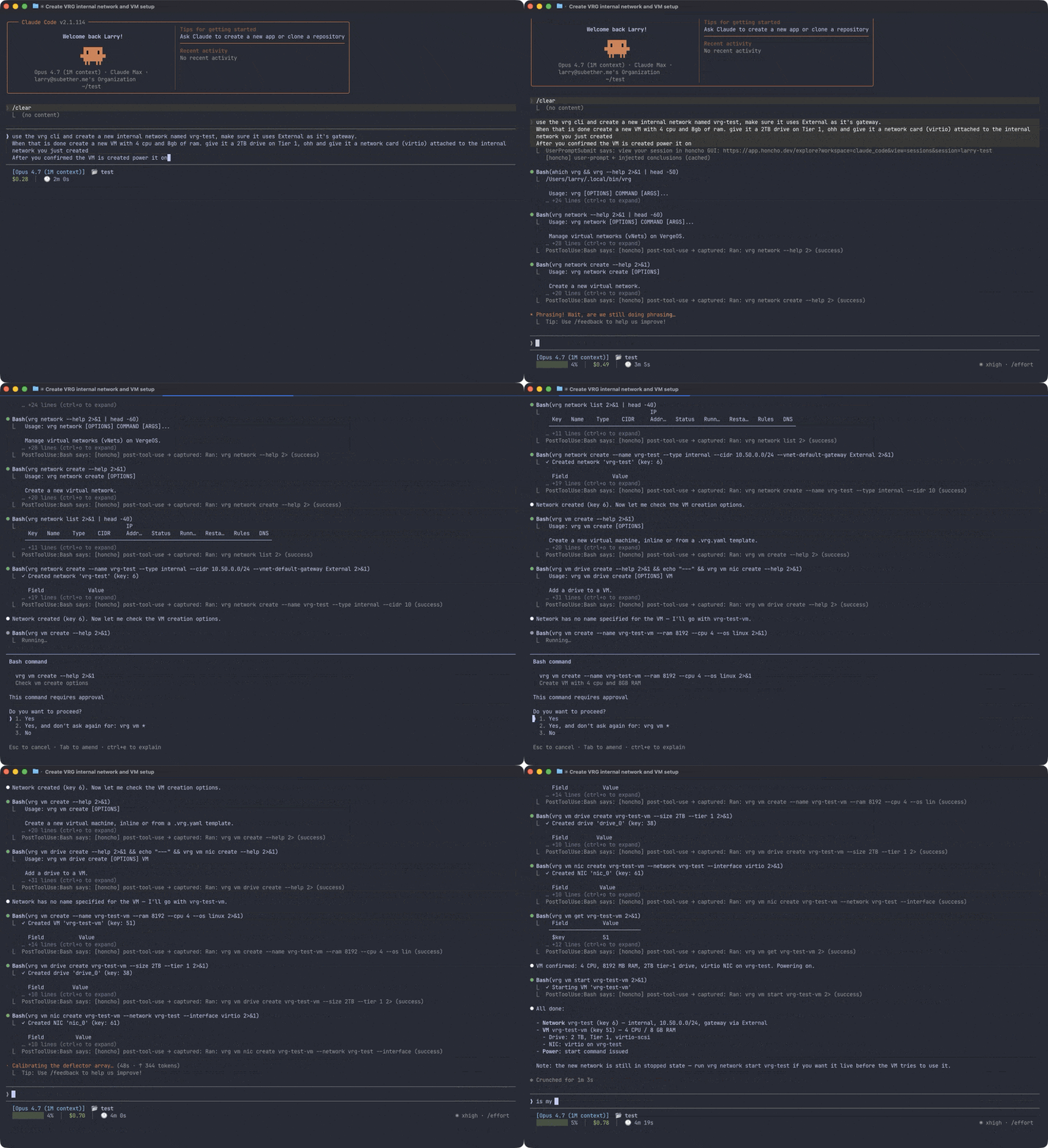
The shakedown deploys real resources against a live VergeOS instance: networks, VMs, tenants, NAS volumes, snapshot profiles, users, groups, API keys, task schedules, certificates, tags. Everything uses a shakedown- prefix for identification and cleanup. Full lifecycle for each resource type: create, list, get, update, destroy.
The specific failures were instructive. For instance, early on the eval agent used -q (quiet mode) when it meant --query (field extraction). That was a real bug in one of my examples. I’d written -q where I meant --query, and the agent faithfully copied it. Fixed the example, the agent stopped confusing them. Similarly, agents would try to resolve every alarm, not understanding that only alarms with is_resolvable = true accept that action. Adding one sentence to the help text (“Only alarms with is_resolvable = true accept resolve”) eliminated the error.
The feedback loop was the real engine. Run eval, watch where the agent stumbles, rewrite that command’s help, run eval again. The webhook command took four iterations. The task script command took three. The alarm command took two — one to add the domain model, one to clarify resolve versus snooze. Each round, the failures got more specific and less frequent, until the agent could run the full shakedown from --help alone.
Of course, this isn’t proof that the approach generalizes. It’s one CLI, one agent, one eval setup. However, the pattern was consistent: every failure traced back to missing or ambiguous information in the help text, and every fix was a documentation change, not a code change.
Four Sessions, One Operator
I ran four Claude Code sessions simultaneously: a code writer, an eval runner (zero context provided), a help text analyst, and a researcher. Anthropic’s own data suggests engineers use AI in about 60% of their work but report being able to fully delegate only 0-20% of tasks (Anthropic, 2026). My experience matched that gap exactly.
The interesting part wasn’t the parallelism. It was what I actually did with my time. I wasn’t writing code or running tests. I was reading eval results, routing findings between sessions, and making judgment calls about when a command’s help text was “done enough.”
The webhook command illustrates the cycle. The eval runner failed: the agent couldn’t figure out what auth types were supported. I sent that finding to the analyst, which drafted help text listing all four types. The code writer implemented it. The eval runner passed. Fifteen minutes, and I spent most of it reading and deciding, not typing.
The bottleneck was never the agents. They wrote code fast, ran evals fast. Rather, the bottleneck was my ability to diagnose why the agent got confused and decide what to change. Four sessions could have been eight. I was the cap. This mirrors what I found when studying how plans drive agent work — the human judgment layer is the constraint, not the model.
What This Means If You Build Tools
The models are fast enough. Google says over 30% of new code is AI-generated (Sundar Pichai, Q1 2025 earnings). Boris Cherny, who created Claude Code, says 100% of his contributions over a 30-day stretch were written by Claude Code itself (Boris Cherny on X, 2025). The model speed question is on a clear trajectory. The tool interface question isn’t.
I didn’t rewrite the CLI from scratch. I didn’t add new features or change core functionality. Instead, I changed help text, output formatting, exit codes, and examples. Interface and documentation work. The commands themselves were already fine. What was missing was the information an agent needs to use them without trial and error.
Better help text, structured output, and deterministic exit codes aren’t concessions to machines. They’re good interface design that humans tolerated the absence of because we could always squint at the screen and figure it out.
If you’re building a CLI, an API, or any tool that agents will consume, start with the --help output of your most-used commands. Whether you’re putting personality in a config file or structuring a CLI for autonomous use, the same principle holds: what the agent reads determines what the agent does. What does an agent learn from your tool’s help? What does it still have to guess?
If an agent has to guess, your tool is the bottleneck — not the model.